How do I set rates for multiple artistes?
Last updated over 6 years ago
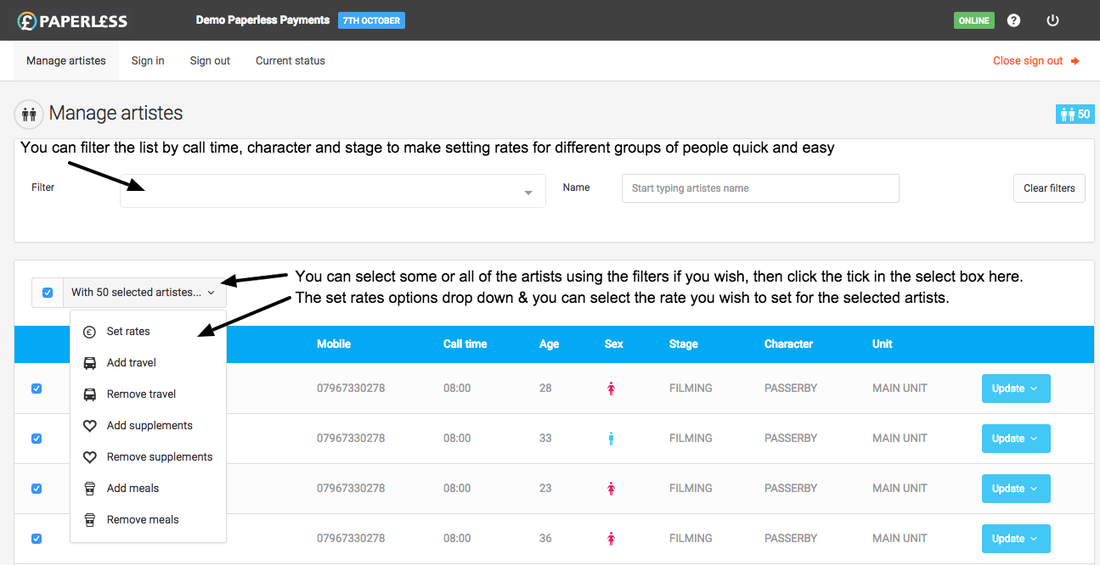
In the "Manage artistes" screen, you can select all or a specific group of artists by call time, character or stage, select the rate you wish to set and the chosen rate will be set for all selected Artistes.
- Use the filter dropdown to find the Artistes you want to set rates for
- Select the checkbox below the filter next to the "With X selected artistes" button (where X will be the number of Artistes you update will affect)
- Click the "With X selected artistes" button and select "Set rates" from the dropdown
- From the pop-up window, select your chosen rate and click the "Update" button
We have also produced some introductory videos concerning setting rates: