How do I set meal or travel penalties against a group of artistes?
Last updated over 6 years ago
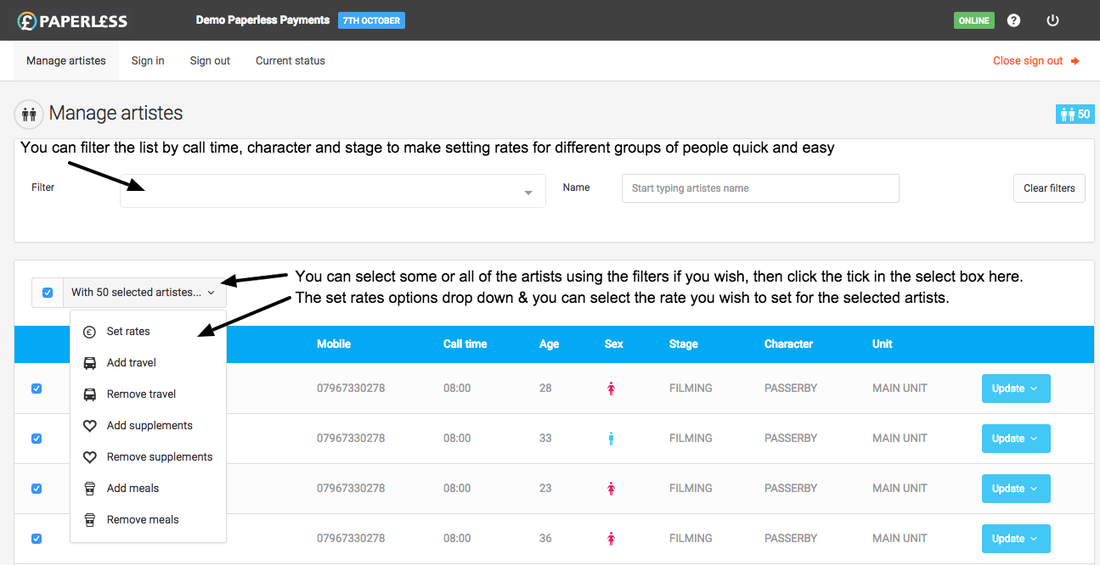
In the "Manage artistes" screen, you can select all or a specific group of artists by call time, character or stage, select the meal or travel penalty you wish to set and all of your chosen Artistes will receive the supplement or penalty.
- Use the filter dropdown to find the Artistes you want to set the meal or travel for
- Select the checkbox below the filter next to the "With X selected artistes" button (where X will be the number of Artistes you update will affect)
- Click the "With X selected artistes" button and select "Add travel" or "Add meals" from the dropdown
- From the pop-up window, select which penalty or penalties you want to add and click the switch from "Leave" to "Add" and click the button at the bottom of the pop-up to finalise your selections.
If you want to remove meal or travel penalties for a group of Artistes then repeat the steps above but at step 3 select "Remove travel" or "Remove meals"