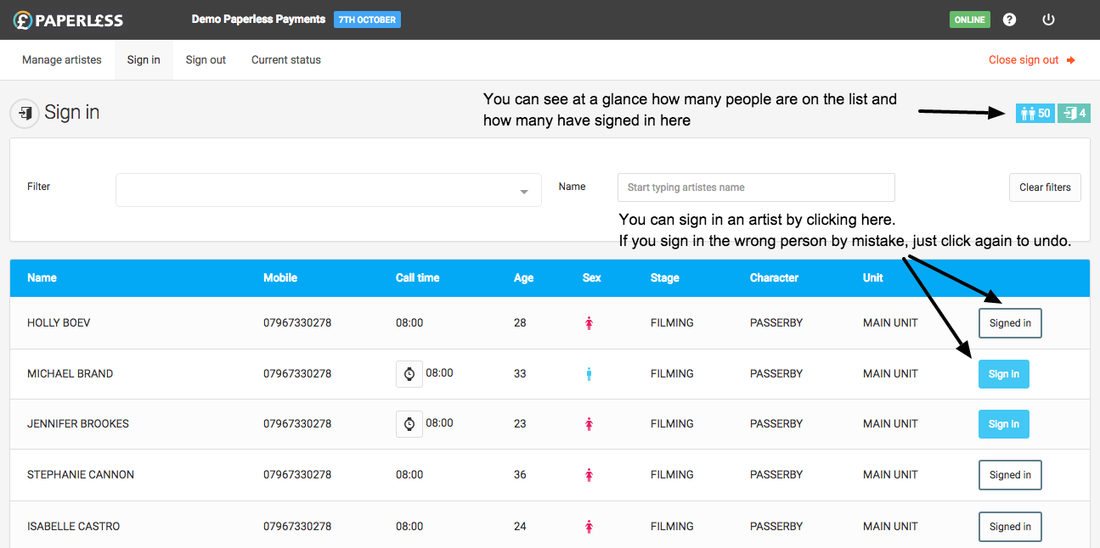
From the dashboard, click into the day and then click the "Sign in" tab.
You can search for an individual artist by starting to type their first or last name into Name filter box. The list will automatically filter as you start typing so you don't need to search for the full name of the Artiste. Alternatively, scroll through the list using the scroll bar on the right.
To sign an Artiste in click their "Sign In" button.
If you want to undo a sign in click their "Signed in" button
If an Artiste is late you should click the watch icon next to their call time in order to sign them in late. In the pop-up box enter the time they came to set (this will default to the current time which you can leave or update as needed) and click the "Sign in" button. All pay calculations will automatically use the late sign-in time.Sign in.png 116.11 KB