"Sign In" explained (open days only)
Last updated over 6 years ago
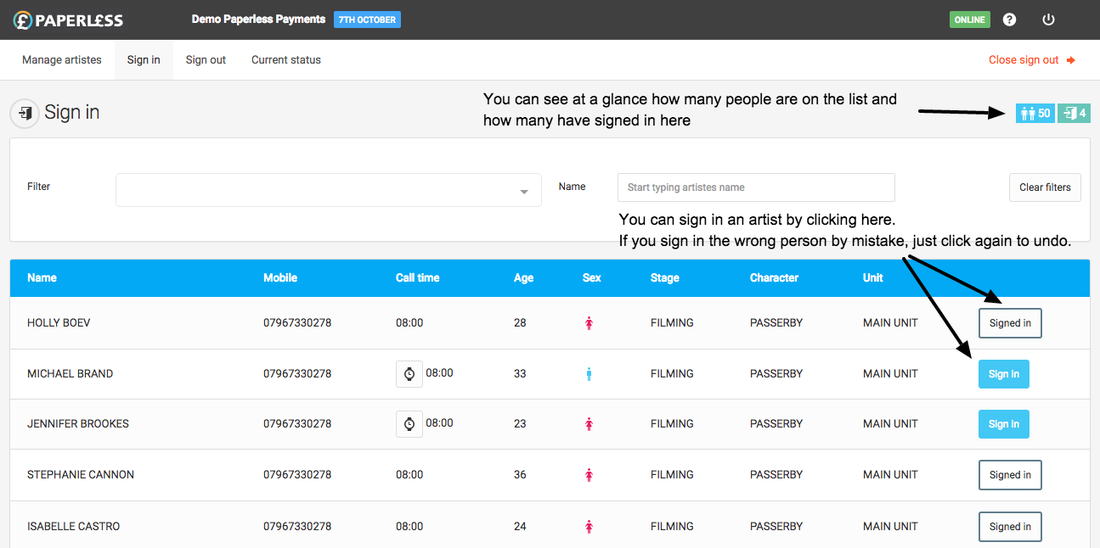
The sign is screen is the equivalent to having all your printed vouchers in front of you. This is where you sign all the Artistes in at the start of the filming day.
You will only see the "Sign in" screen if the day is "Open".
Below is an introduction video to the sign-in process
Start typing a person's name and hit the "Sign in" button to sign them in or if you prefer you can scroll up and down the list to look for their name.
Alternatively, you can use the "Filter" dropdown to find groups of Artistes. For example if you were signing people in on the Main unit you can use the filter dropdown to only show those Artistes.
If you accidentally sign somebody in or need to undo a sign-in simply click the "Signed in" button. You will only be able to undo a sign in if the Artiste hasn't already been signed out.
If an Artiste is late you can mark this by clicking the watch icon next to their call time and entering the time they came to set. All pay calculations will automatically take into account their late sign-in.